
Amazon A+ Content Generator: Build EBC From Your Product Assets
Stop briefing a second designer for Enhanced Brand Content. Our Amazon A+ Content generator builds complete EBC suites (hero banners, comparison charts, and Brand Story cards) directly from the locked product assets in your Nozam workspace.

- Step 01Lock your 7-slot galleryStart with your core listing images in your workspace.
- Step 02Select A+ module suiteChoose from comparison tables, hero banners, and story cards.
- Step 03Export checked assetsCompliance Guard audits every image before download.
Generate A+ Banners & Comparison Charts From Your Listing Assets
Creating A+ Content usually means starting a second, disconnected design cycle with a different freelancer, a new template, and lifestyle scenes that look like a different product. Nozam generates A+ modules from the same Visual DNA™ geometry as your listing gallery, so your hero banners, technical specs, and comparison tables match your gallery lighting and branding.
- SAME BRAND ASSETS
- NO SECOND DESIGN CYCLE
- VISUAL CONTINUITY

Pre-Sized to 970 px Basic and 1464 px Premium A+ Specs
No more manually resizing Basic banners to 970 × 600 px, cropping quadrant squares to 300 × 300 px, or building separate 1464 × 600 px desktop and 600 × 450 px mobile layouts for Premium A+. Comparison charts, feature callouts, Brand Story cards, and specification modules export at Amazon's exact dimensions under the 2 MB file limit, ready for the A+ Content Manager.
- 970PX BASIC SPECS
- 1464PX PREMIUM
- SELLER CENTRAL READY
Checked by Compliance Guard Before Submission
Amazon's A+ moderation team rejects submissions for unverified health claims, restricted text overlays, or pricing words ('affordable', 'best deal'). Every A+ module runs through Compliance Guard to catch policy violations before you submit, helping you avoid a rejection and another review wait (Amazon's A+ review takes up to seven business days).
- TOS AUDIT
- CLAIM VALIDATION
- REJECTION PROTECTION
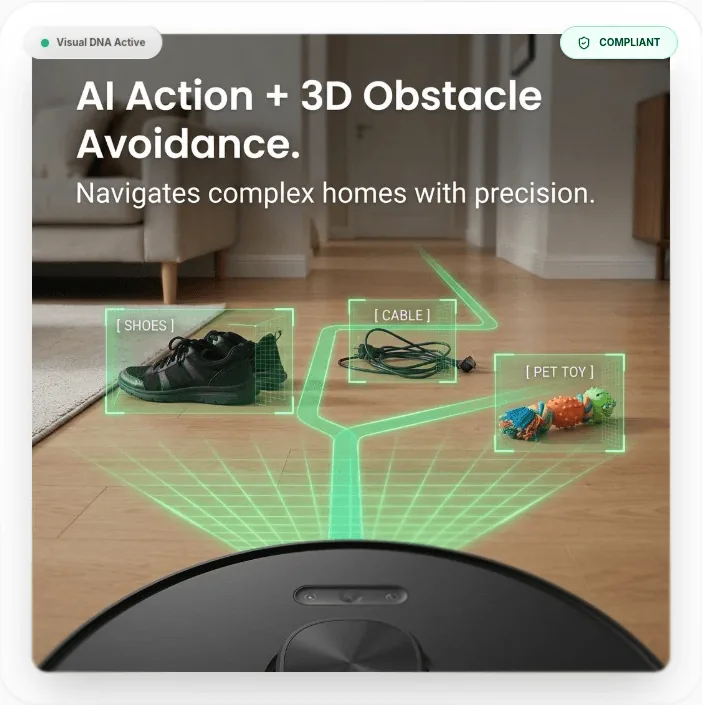
Why Use an Amazon A+ Content Generator Tied to Your Listing Assets
Most brands fill A+ slots with generic lifestyle banners that repeat their bullet points. When built from your product workspace, these four modules answer the specific doubts shoppers still have after scrolling past the gallery:
Comparison Matrix (Standard Comparison Table)
The highest-ROI module in A+. Displays your own product variants side-by-side with clickable links and key metrics, keeping shoppers inside your catalog instead of returning to search results.
Hero Banner with Text (Standard Image Header)
Captures attention as the shopper scrolls past the fold. Used to state your primary brand promise or address the #1 complaint buyers have about competitor products.
Four-Image Feature Quadrant (Four Image & Text)
Ideal for 'What's In The Box' inventories or step-by-step application instructions. Shows every cord, attachment, or usage step with clear supporting text.
Single Left / Right Image with Text
Focuses on a specific material, lab test, or engineering detail to answer the recurring 1-star and 2-star reviews in your niche.
Need the exact pixel dimensions and templates for all 17 Basic & Premium modules?
Review our comprehensive guides: What is Amazon A+ Content (Pillar Guide), A+ Content Dimensions Cheat Sheet, or 7 Proven A+ Content Layout Examples.
Amazon A+ Content Generator FAQs
Who is eligible to create Amazon A+ Content?▾
Any seller enrolled in Amazon Brand Registry with an active registered trademark can publish Basic A+ Content and Brand Story modules for free. To unlock Premium A+ (A++), you must publish an approved Brand Story on every active ASIN in your catalog and have at least 5 approved A+ Content submissions in the prior 12 months. Amazon has changed these criteria before, so confirm them in your A+ Content Manager.
Does Amazon index text inside A+ Content for organic search?▾
Text flattened inside JPEG or PNG banners cannot be read by search engines. However, live text typed into A+ module text fields and the 100-character Image Keywords alt-text field on each image can be read by screen readers and Amazon's AI shopping assistant. Always keep your primary keywords in your title, bullets, and backend search terms.
How does A+ Content affect listing conversion rate?▾
Amazon says Basic A+ Content can lift sales by up to 8%, and Premium A+ by up to 20%. Treat those as ceilings, not forecasts. The biggest lifts come from comparison charts that prevent shoppers from leaving your listing to browse alternatives.
Why do A+ submissions get rejected by Amazon moderation?▾
The most common triggers are promotional wording ('cheap', 'best seller', 'free shipping'), unsubstantiated superlatives ('#1 rated' without third-party proof), external contact details or URLs, and blurry images below Amazon's required pixel dimensions. Compliance Guard scans your modules for these triggers before you export.